
One free plugin adds Chargedeck as a payment method in WooCommerce. Shoppers pay on a secure hosted checkout, the money settles in your own processor account, and the order is marked paid by a signed webhook. Works with the block checkout and the classic checkout.
Plugin version 1.1.0. Tested with WooCommerce 10.7. Free for 7 days, no card.
Install the free Chargedeck plugin, paste two keys, and switch on Chargedeck under WooCommerce, Settings, Payments. Your cart total goes to a Chargedeck checkout and the paid order comes back by signed webhook.
One plugin covers Stripe, PayPal and Square: whichever account you connect in Chargedeck is where the money lands. The plugin is free; taking payments needs a Chargedeck plan from $9.99 a month with 0% of your sales.
Four steps, and the shopper only sees two of them.
They choose the Chargedeck method at your WooCommerce checkout, block or classic. The plugin sends the order total, currency and order number to Chargedeck.
A secure, mobile-first payment page opens with your brand on it. Card details go to your processor, never through your WordPress site.
Chargedeck tells your site the order is paid. The plugin checks the signature, the amount and the currency before it believes it.
WooCommerce reduces stock and sends its usual emails. The shopper is back on your order received page.
The payment method shows in the Cart and Checkout blocks, the default on new stores, and on the classic shortcode checkout.
HMAC-SHA256 signatures with a timestamp. Old, replayed or forged messages are refused, and an underpaid or wrong-currency payment never completes an order.
If the shopper returns before the webhook lands, the plugin asks Chargedeck for the status once and completes the order.
Declared compatible with WooCommerce custom order tables, so there are no warnings on the Plugins screen.
Connect your own Stripe, PayPal or Square in Chargedeck. Change processor later without touching WordPress.
Settings, Chargedeck says whether payments are on. If your plan lapses, the method hides from shoppers instead of failing at the last step.
Real screens from WooCommerce 10.7 on WordPress 7.0.
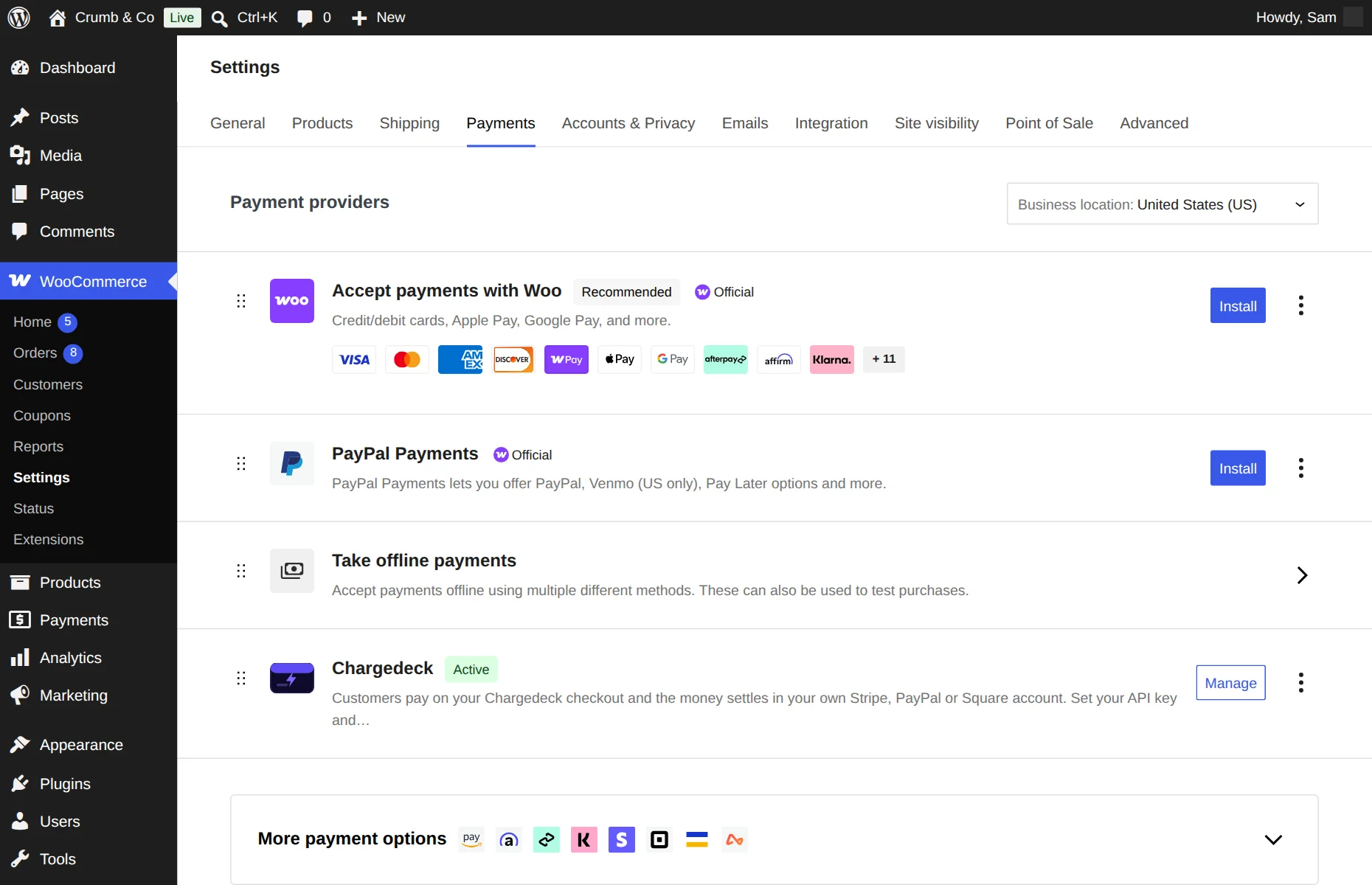
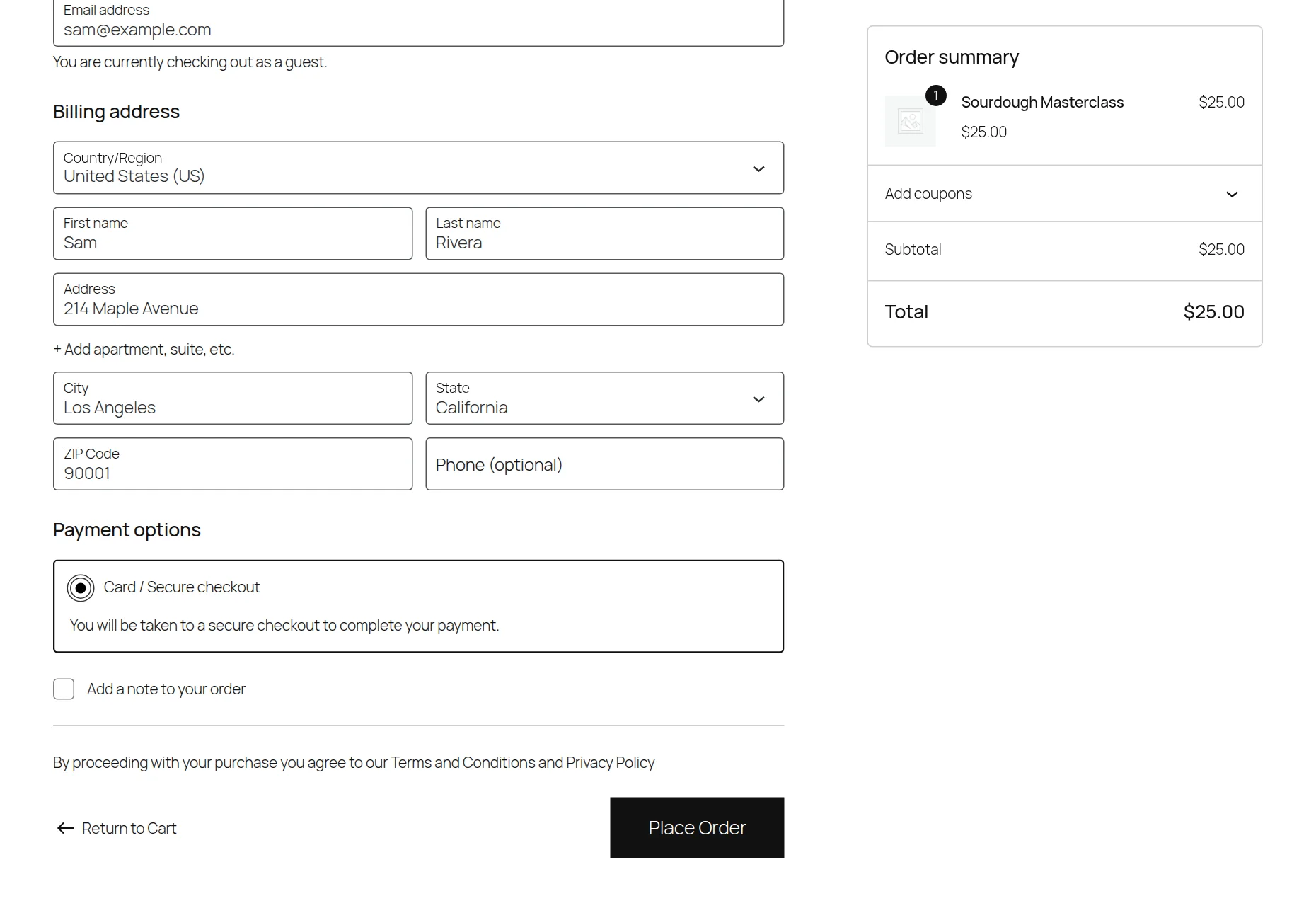
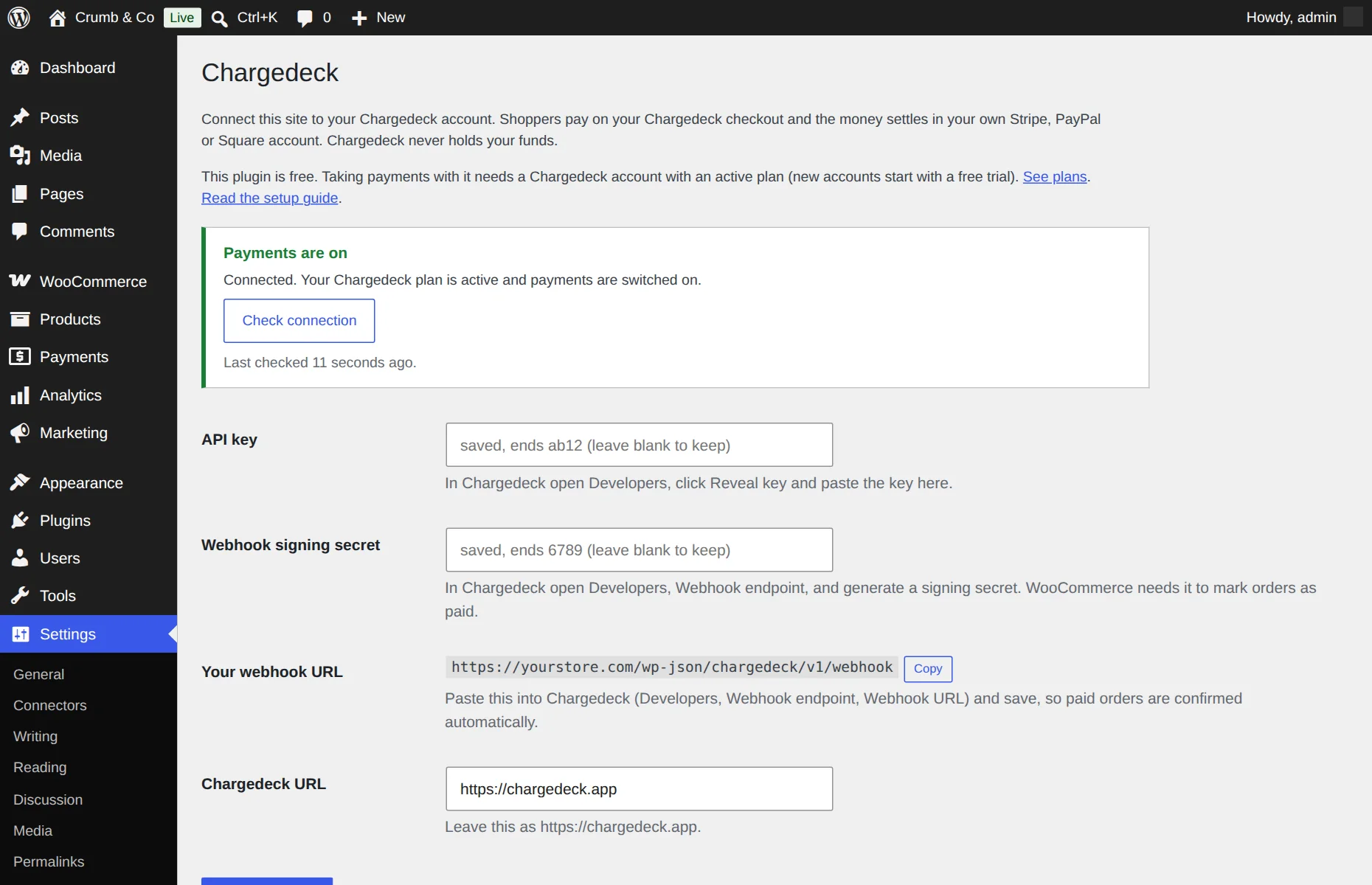
About five minutes on a store that already takes orders.
The payment method stays hidden until both the API key and the signing secret are saved. That is deliberate: without the secret, a paid order could not be confirmed safely.
The plugin is free and always will be. What it connects to is your Chargedeck account, and that is where the plan lives.
See the three plans on the pricing page.
Checked on a clean store before release.
| Supported | Notes | |
|---|---|---|
| WooCommerce | 6.0 and newer | Tested with WooCommerce 10.7 |
| Block checkout | Yes | Cart and Checkout blocks |
| Classic checkout | Yes | The [woocommerce_checkout] shortcode page |
| High-Performance Order Storage | Yes | Declared compatible |
| Guest checkout | Yes | No shopper account needed |
| Simple, variable and virtual products | Yes | The order total is what gets charged |
| Shipping, fees and discounts from WooCommerce | Yes | Included in the total sent to the checkout |
| Store currencies | USD, GBP, EUR, CAD, AUD | Other currencies hide the method |
| Refunds from the WooCommerce order screen | Not in this version | Refund in your processor dashboard |
| WooCommerce Subscriptions | No | Chargedeck does not do recurring billing |
We would rather you knew before you install anything.
Chargedeck is a hosted checkout: the shopper leaves your checkout page for a moment to pay, then comes back. If you want card fields that sit inside your own WooCommerce checkout page, the official Stripe or PayPal plugins do that and Chargedeck does not.
It does not handle subscriptions, and refunds are made in your Stripe, PayPal or Square dashboard, not from the WooCommerce order screen. It does not calculate tax; WooCommerce still does that, and the total it works out is the total that gets charged.
Where it fits well: you want one plugin that works with whichever processor you use, a flat fee with 0% of your sales, and the same Chargedeck account running your payment links, your link-in-bio store and your WooCommerce store.
Chargedeck is non-custodial. A buyer's payment goes from their card or bank straight into your own processor account, and your processor pays you out on its normal schedule. The money never sits in a Chargedeck balance, so there is nothing for us to take a percentage of.
The price does not move when your sales do. Pick by how many brands you run, not by how much you earn.
Everything you need to sell, on one brand.
For sellers running more than one brand.
Every brand and storefront, one login.
Free for 7 days with everything unlocked, no card needed. After that, selling needs a plan; your link-in-bio page stays free. Prices in USD, billed monthly, cancel anytime. No plan has a sales cap.
The plugin is free to download and install. To take payments through it you need a Chargedeck account with an active plan, from $9.99 a month, and every new account starts with a 7-day free trial and no card. Chargedeck takes 0% of your sales.
Your own Stripe, PayPal or Square account. You connect the processor inside Chargedeck, so the same WordPress plugin works with all three.
Yes. The payment method appears in the Cart and Checkout blocks and in the classic shortcode checkout, and the plugin declares compatibility with both the block checkout and High-Performance Order Storage.
No. The shopper pays on a hosted Chargedeck checkout and the card details go to your processor. Your site only receives a signed message saying the order was paid.
The order is still completed. Chargedeck sends the signed webhook to your site whether or not the shopper comes back, and retries if your site is briefly unreachable.
Not from the WooCommerce order screen in this version. Refund the payment in your Stripe, PayPal or Square dashboard and mark the order refunded in WooCommerce.
Open Settings, Chargedeck and read the status box. The usual reasons are a missing signing secret, a Chargedeck plan that is not active, no payout processor connected, or a store currency other than USD, GBP, EUR, CAD or AUD.
Yes. Every new account gets 7 days with everything unlocked, and you do not enter a card to start. After the trial, selling needs a plan from $9.99 a month. Your link-in-bio page stays free forever.
From the blog: WooCommerce Payment Gateways: How They Work and How to Choose One
Download the free plugin and switch on the payment method. Free for 7 days, no card, 0% of your sales.